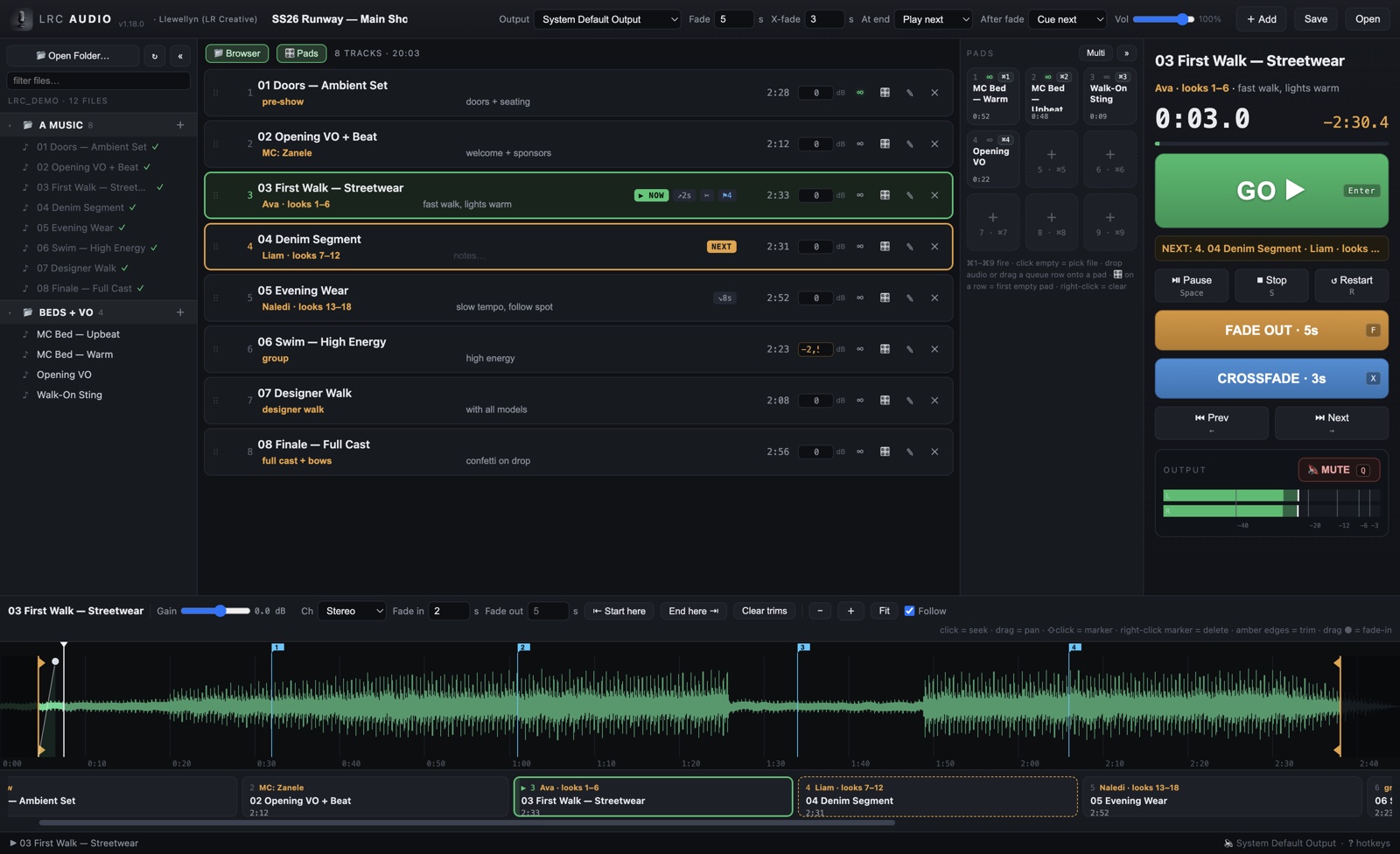
Show playout for Mac — built for runways, by show people. Cue lists with one big GO, waveform trims, fades and crossfades, looping tracks, a soundboard for MC beds, and hotkeys for everything. It runs your show; you keep your eyes on the room.
Free trial: every feature, 30 minutes per session · macOS (Apple Silicon) & Windows 10/11
A cue list that always shows NOW and NEXT. Enter fires the next track, digits jump to any number, and a Spotlight-style finder plays any track by name or by the model it belongs to.
Zoomable waveforms with draggable trims, fade-in handles, per-track gain and channel fixes — all non-destructive, your files are never modified. Markers with Reaper-style [ ] jumping for rehearsals.
One-key fade-outs with per-track timing, equal-power crossfades, seamless looping tracks that repeat until you move on, and configurable at-end behaviour per show.
Nine pads for MC beds, stings and voice-overs on ⌘1–⌘9. Beds loop until you stop them, fade out automatically when the playlist resumes, and never touch your running order.
Pick any output interface, watch real stereo meters, and hit master mute when the venue asks for silence. Hot-plugged interfaces appear within seconds.
Fully offline — no internet needed at the venue, ever. Continuous autosave, session restore, instant preloaded starts, and a panic key that silences everything at once.
The trial is the full app — every feature, 30 minutes per session. Run a real rehearsal with it.
Pay securely with Yoco. Once-off — no subscription, no account.
Your personal licence key arrives by email. Paste it once — the app shows your name and the 30-minute limit is gone.
R200 · ONCE-OFF · NO SUBSCRIPTION
Pay with your full name and email at checkout — your licence is issued to that name and your key is emailed to you, normally within a few hours. Paid but nothing arrived? Send your Yoco receipt to info@lrcreative.co.za.
Apple Silicon (M1 or newer) · macOS 11+ · ≈116 MB
Download for Macxattr -dc "/Applications/LRC Audio.app"Windows 10 / 11 · 64-bit · ≈96 MB
Download for WindowsWindows on ARM (Surface, VMs on Apple Silicon)? Use the ARM64 installer.
Activating: click the amber TRIAL tag next to the logo and paste your licence key — the same key works on both platforms.
No. Playback, licences and everything else work completely offline. Venues with no signal are exactly what it was built for.
After 30 minutes the audio fades out gracefully. Restart the app for another full session, or activate your licence and the limit is gone.
Your key is yours — paste it on the new machine and carry on. If you ever lose it, mail us and we’ll look it up.
info@lrcreative.co.za — it’s built by the person who answers the mail.